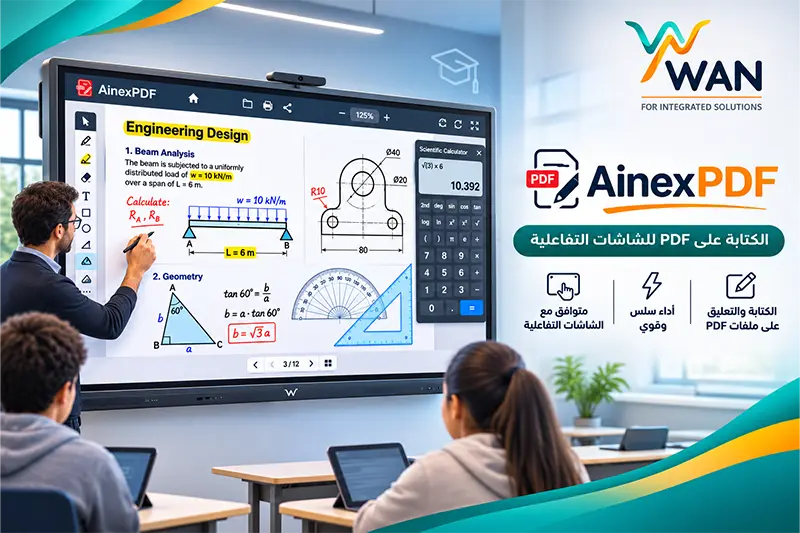
If you use an interactive display in a school, university, training center, or business and need to open, write on, explain, and work directly on PDF files, WAN Integrated Solutions provides AinexPDF, a dedicated application designed for writing on PDF files using interactive displays.
AinexPDF is more than a standard PDF reader. It combines PDF viewing, writing, annotation, geometry tools, a scientific calculator, engineering drawings, and interactive touch support in one application.
The software is available free of charge for WAN customers according to the activation terms. Non-WAN customers can test the software for 3 days before purchasing the full version with a one-time payment for a permanent license.
What Is AinexPDF?
AinexPDF is software designed for displaying, explaining, writing on, and working with PDF files on interactive displays.
The main idea behind the application is to make books, worksheets, educational materials, presentations, and PDF documents easier to use during live teaching and presentations.
Instead of relying on a conventional PDF reader, teachers and users can open a PDF file, write directly on it, move between pages, add notes, and use educational and mathematical tools without leaving the application.
Why Is AinexPDF Suitable for Interactive Displays?
Using PDF files on an interactive display is different from using them on a standard desktop computer.
Teachers and presenters need smooth touch response, easy pen writing, fast page navigation, zooming, and reliable performance during a live lesson or meeting.
AinexPDF is designed around this type of interaction, making it suitable for classrooms, training centers, universities, and meeting rooms.
InGlass Support for Interactive Displays
One of the key features of AinexPDF is support for advanced InGlass touch and writing experiences on compatible interactive displays.
This helps provide a more natural experience when using a pen or touch for:
- Writing on PDF files.
- Solving questions and exercises.
- Adding notes and annotations.
- Drawing and highlighting.
- Live classroom explanation.
- Using geometry tools.
AinexPDF Supports Different Interactive Display Brands
AinexPDF is not limited to one interactive display brand.
The software is designed to work with different compatible interactive display systems, including:
- Promethean
- Hikvision
- Horion
- Spectron
- Other compatible interactive displays.
This gives schools and organizations greater flexibility, especially when they use different brands or display models across multiple classrooms or locations.
Android 5 to Android 16 Support
AinexPDF supports a wide range of Android versions from Android 5 up to Android 16.
This allows the application to run on different generations of interactive displays, from older systems to newer Android-based models.
As a result, organizations may be able to continue using existing interactive displays without replacing the device simply to run modern PDF annotation software.
Open Large PDF Files with More Than 1,000 Pages
One of the common problems when using standard PDF applications on interactive displays is slow performance when working with large files.
AinexPDF is designed to handle large documents and can be used with PDF files containing more than 1,000 pages.
This is especially useful for teachers who work with complete textbooks, reference materials, or large educational documents throughout the academic term.
Write and Annotate Directly on PDF Files
The main purpose of AinexPDF is to transform a PDF document from a static reading file into an interactive teaching and presentation surface.
Using the application, users can:
- Open PDF files.
- Write directly on pages.
- Add annotations.
- Highlight important information.
- Draw on the document.
- Navigate through pages during a lesson.
- Use the interactive display pen and touch system.
Built-In Geometry Tools
AinexPDF is especially useful for mathematics, engineering, and science teachers because it includes geometry tools directly inside the application.
This allows teachers to explain and draw without leaving the PDF document or opening a separate application.
These tools can be used for:
- Explaining geometric shapes.
- Drawing lines and angles.
- Solving geometry problems.
- Creating diagrams during lessons.
- Working directly on exercises inside the PDF file.
Built-In Scientific Calculator
AinexPDF also includes a scientific calculator within the application.
This can be useful for teachers and students working with:
- Mathematics.
- Physics.
- Chemistry.
- Statistics.
- Other scientific subjects.
Instead of leaving the PDF software and opening another application, users can perform calculations while continuing to work on the document.
Engineering and Geometric Drawings
In addition to writing tools and the scientific calculator, AinexPDF includes features that support geometric and engineering drawings.
This makes the application particularly useful in classrooms that depend heavily on visual, mathematical, and technical content.
AinexPDF for Teachers and Schools
One of the main use cases for AinexPDF is the smart classroom.
A teacher can open a textbook or worksheet in PDF format and then:
- Explain directly on the page.
- Write answers next to questions.
- Highlight important information.
- Use geometry tools.
- Open the scientific calculator.
- Interact with the document using pen and touch.
This turns a traditional PDF document into an interactive teaching resource during the lesson.
AinexPDF for Universities and Training Centers
AinexPDF is not limited to school classrooms.
Universities, lecturers, instructors, and training centers can use it to explain and annotate:
- Lecture notes.
- Research documents.
- E-books.
- Training materials.
- Presentations.
- Technical documents and diagrams.
AinexPDF Is Free for WAN Customers
WAN Integrated Solutions provides AinexPDF free of charge to WAN customers, according to the applicable activation terms.
WAN customers can download the application and contact technical support to request activation for their interactive display.
How to Activate AinexPDF
The activation process is straightforward.
After installing the software:
- Open AinexPDF on the interactive display.
- Locate the software serial number shown on the device.
- Send the serial number to the WAN team.
- The activation request is reviewed.
- WAN sends the activation code.
- Enter the code in the application to activate the full version.
Once activated, the application can be used on the registered display.
Contact Technical Support for AinexPDF Activation
If you are a WAN customer and need help downloading, installing, or activating AinexPDF, you can contact WAN technical support directly.
Technical Support: 01099943875
Technical Support Email: support@wan-is.com
Customer Service and Follow-Up: 01070100196
Not a WAN Customer? Try AinexPDF Free for 3 Days
If you are not currently a WAN customer, you can try AinexPDF for 3 days before purchasing the full version.
The trial period allows you to test the application on your interactive display and decide whether it fits your teaching, training, or presentation workflow.
After the trial period, you can request the full version from WAN.
Pay Once and Use AinexPDF with a Permanent License
The full AinexPDF license offered under the current licensing model does not require a monthly or annual subscription.
The software cost is paid once to obtain a permanent license, instead of paying recurring subscription fees.
This makes the application particularly suitable for schools, teachers, training centers, and businesses that prefer a predictable software cost.
Buy AinexPDF Online from WAN
Non-WAN customers can request the full version directly from the WAN website.
View AinexPDF and order the full version from WAN
The AinexPDF product page provides access to the software offered for PDF explanation, writing, and interactive display use.
Contact the WAN Sales Team
If you need information about purchasing, licensing, or activating AinexPDF as a non-WAN customer, you can contact the sales team directly.
Sales: 01040023407
The sales team can assist with purchasing the full version and completing the activation process.
Why Is AinexPDF Different from a Standard PDF Reader?
A conventional PDF reader is mainly designed for opening and reading documents.
AinexPDF is designed to provide a more complete experience for interactive displays.
It combines:
- PDF viewing.
- Pen writing.
- Touch interaction.
- InGlass support.
- Geometry tools.
- Scientific calculator.
- Geometric drawings.
- Large document support.
- Compatibility with multiple Android versions.
Does AinexPDF Work on Promethean Interactive Displays?
Yes. AinexPDF is designed to support compatible Promethean interactive displays, along with other supported display brands.
Does AinexPDF Work on Hikvision Interactive Displays?
Yes. AinexPDF can be used on compatible Hikvision interactive displays running supported Android versions.
Does AinexPDF Work on Horion and Spectron Displays?
AinexPDF also supports compatible interactive displays from Horion and Spectron, in addition to other compatible models.
Frequently Asked Questions About AinexPDF
What is AinexPDF?
AinexPDF is software for opening, writing on, explaining, and working with PDF files using interactive displays, with additional educational and mathematical tools.
Is AinexPDF free?
The software is available free of charge for WAN customers according to the applicable activation terms. Non-WAN customers can use the 3-day trial before purchasing the full version.
Does AinexPDF require a monthly subscription?
No. Under the current licensing model, the full version is available through a one-time payment for a permanent license.
Which Android versions are supported?
AinexPDF supports Android versions from Android 5 through Android 16.
Can AinexPDF open large PDF files?
Yes. The application is designed to work with large PDF documents and can handle files containing more than 1,000 pages.
Does AinexPDF include geometry and mathematics tools?
Yes. AinexPDF includes geometry tools, geometric drawing features, and a built-in scientific calculator.
How do I get the activation code?
After installing the application, send the software serial number displayed on the interactive screen to WAN. The team will review the request and provide the activation code.
Where can I buy AinexPDF?
You can order the software directly through the WAN website or contact the WAN sales team.
Order AinexPDF online from WAN
Conclusion: Turn PDF Files into an Interactive Teaching Experience with AinexPDF
If you mainly use your interactive display to work with textbooks, worksheets, training documents, or educational PDF files, AinexPDF brings the tools needed for live explanation into one application.
PDF Writing + InGlass + Geometry Tools + Scientific Calculator + Geometric Drawings + Large File Support + Android 5 to Android 16
The software also supports a range of compatible interactive display brands including Promethean, Hikvision, Horion, and Spectron.
If you are a WAN customer, contact technical support to download and activate the application.
If you are not a WAN customer, you can test AinexPDF free for 3 days and then purchase the full version with a permanent one-time license.
Download or purchase AinexPDF from WAN
Technical Support: 01099943875
Customer Service: 01070100196
Sales: 01040023407
WAN Integrated Solutions — With WAN, You Are Safe.